


Чит DayZ [Exlab]
Ищете функциональный чит для DayZ? На dragon-hack.pro вы можете приобрести приватный софт Exlab с набором инструментов для игрового процесса. Встроенный Radar помогает получать дополнительную информацию об окружении и лучше ориентироваться в игровом мире.
Видео
Функции Софта
- Always on - Silent aim works without holding the bind
- ESP distance limit - Aim works only within the rendering radius of players/zombies on ESP
- FOV of the aim - Draws a circle of the aim's field of view on the screen
- FOV size — Radius of the aiming FOV circle in pixels
- Active Target - Shows the target's current target label above the ESP markers
- Line to Target - Draws a line from the crosshair to the bone that the aim is aimed at.
- Modify Bullet Speed - Increases bullet speed to bypass the 50m limit
- Show bullet speed - Shows original and modified bullet speed
- Draw bullet tracer - Draws the trajectories along which bullets flew
- Aim at players
- Silent aim - Enables silent aimbot for players
- Bind: Silent aim on players - Hold to activate silent aim on players
- Max. distance (players) — Maximum aiming distance for players in meters
- Target Bones: Head, Neck, Chest, Pelvis, Left Leg, Right Leg
- Miss chance - Probability of missing silent aim for each bullet (players), %
- Aim at zombies
- Silent aim - Enables silent aimbot for zombies
- Bind: Silent aim on zombies - Hold to activate silent aim on zombies
- Max. distance (players) — Maximum aiming distance for players in meters
- Target Bones: Head, Neck, Chest, Pelvis, Left Leg, Right Leg
- Miss chance - Probability of missing silent aim for each bullet (players), %
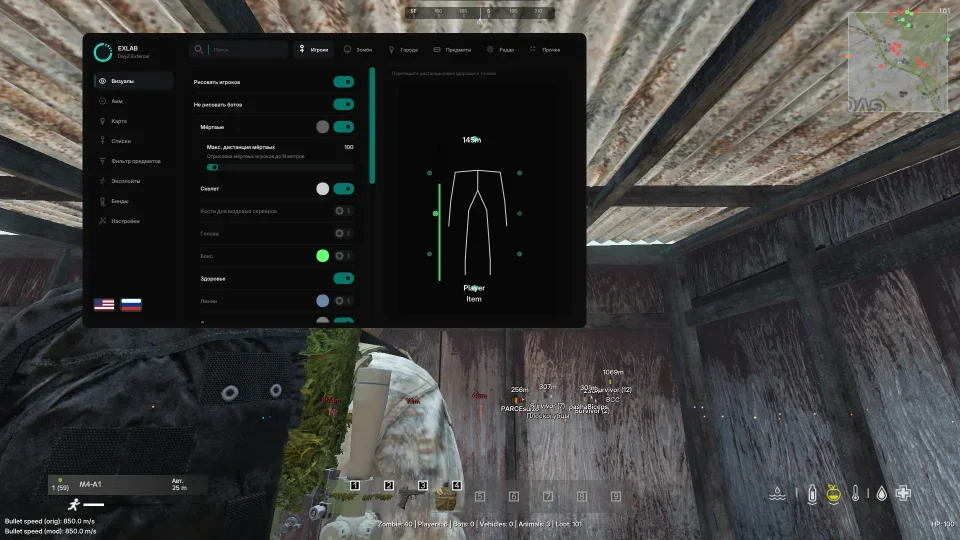
- Draw Players - Player ESP Master Switch
- Don't draw bots - Hides ESP on bots
- Dead - Shows dead player marker
- Max. dead distance - To what distance to draw dead players
- Skeleton - Draws the player's skeleton
- Head - Draws a circle on the player's head
- Boxing - Draws a box around the player
- Boxing type - Regular box or corner
- Health - Draws a health bar
- Lines - Draws lines towards the player
- Line From - Starting point of the line: top / center / bottom of the screen
- Off-Screen Arrows - Arrows pointing to players off-screen
- Friends arrow color - Friends arrow color
- Arrow distance - Distance of the arrows from the center of the screen
- Arrow Size - Arrow Triangle Size
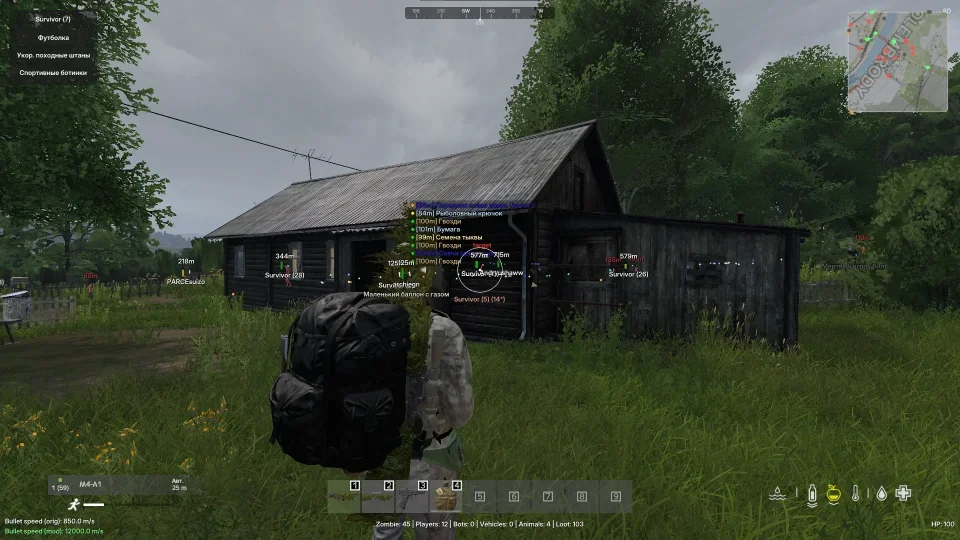
- In Hand - Shows the item in the player's hands
- Name - Shows the player's name
- Distance - Shows the distance to the player
- Max. distance — Maximum distance for drawing ESP players
- Local Player - Enable display of yourself on ESP
- Player Preview - Preview the location of markers (name, distance, health)
- Zombie
- Draw Zombie - Zombie ESP Master Switch
- Boxing - Draws boxing around zombies
- Boxing type - Regular or corner box
- Skeleton - Draws a zombie skeleton
- Head - Draws a circle on the zombie's head
- Lines – Draws lines to the zombies
- Name - Shows zombie tag
- Distance - Shows the distance to the zombie
- Max. distance — Maximum drawing distance for ESP zombies
- Zombie Preview - Preview the location of markers (name, distance, health)
- Radar
- Enable Radar - Shows a radar minimap on the screen
- Position - Screen Angle: Top Left / Right / Bottom Left / Right
- Offset X/Y - Offset of the radar from the edge of the screen
- Radar Size - Radius of the radar in pixels
- Square Shape - Square radar instead of round
- Rotate with camera - Radar rotates in the direction you are looking
- Show background - Draws the background of the radar
- Background Transparency - Radar background transparency
- Show Frame - Draws a frame for the radar
- View Direction - Players' line of sight on the radar
- Crosshair - Crosshair in the center of the radar
- Dot Size - Size of radar blips
- Players / Zombies / Friends / Dead players / Animals / Vehicles - Show matching targets on the radar
- Cities - Show city labels on radar
- City names - City signatures on radar
- Hide bots - Do not show bots on the radar
- Radar range - Radar range in meters
- Max. distance - Max. target distance on radar
- Show distance - Distance at the markers on the radar
- Show meters - Suffix “m” for distance
- Dynamic radar - Smoothly moving away the radar as the speed increases
- Cities
- Draw Cities - Shows city labels on the map/world
- Show nearest city - Shows the nearest city next to the radar
- Map - Map selection: Chernarus / Livonia / Sakhalin
- On Hover - Show city names only on hover
- All - Show all cities in one color
- City list - Enable/disable and color for each city
- Loot
- Draw loot - Enables ESP of items on the ground
- On Hover - Show item names only on hover
- Item List - Grouped list of items nearby
- Filter by name - Custom text filters
- Modified servers - Disables categories and shows all loot in one color
- Loot distance - Maximum display distance of loot
- Weapons - Firearms and bladed weapons, guns
- Magazines - Magazines and ammo
- Body kits - Sights, silencers, stocks and other body kits
- Medicine - First aid kits, bandages, syringes, heating pads, etc.
- Food and Drinks - Food and Drinks
- Clothing – Clothing and equipment
- Containers – Barrels, boxes, cases
- Backpacks – Backpacks and bags
- Base Construction - Materials and items for building a base
- Tools - Tools and Utilities
- Edged weapons - Knives, axes, brass knuckles, etc.
- Automotive parts - Transport parts
- Other - Unclassified Items
- All items - Show all items without category filter
- Perfect (Pristine) - Show items in perfect condition (Item Quality)
- Worn - Show slightly worn (Item quality)
- Damaged - Show damaged (Item quality)
- Badly - Show badly damaged items (Item quality)
- Ruined - Show destroyed (Item quality)
- World / Other
- Draw cars - ESP transport on the map
- Car distance - Maximum distance of ESP cars
- Draw Animals - Animal ESP
- Animal Distance - Maximum Animal ESP Distance
- Player Inventory - Shows the contents of the player's inventory
- Inventory FOV - FOV circle for inventory function
- Sight - Point in the center of the screen
- World Info - Entity counter at the bottom of the screen
- Draw Azimuth - Displays the azimuth ruler in the top middle
- Draw your HP - Display your own health
- Show Players - Scans and populates a list of nearby players
- Your ID - Displays your Steam ID
- Bind: Add Friend - Add/remove a friend for the selected player or target in FOV
- Add Friend FOV - Circle FOV for quickly adding a friend
- Friend FOV Radius - Size of the friend's adding FOV circle
- Player Details - Friend's ESP Preview, Skeleton/Box/Line/Text Colors
- Add/Remove Friend - Manage the list of friends for the selected player
- List of items
- Show items - Collects a list of items in a radius
- Teleport - Teleport the selected item
- Loot Teleport - Teleports an item within the FOV radius
- Corpse Teleport - Teleports a corpse within the FOV radius
- Remove Grass - Disables grass rendering
- FreeCam - Free debug camera
- Speed FreeCam - Speed of movement of the debug camera
- Teleporter FOV - Draws a circle FOV for the teleporter
- TP FOV size - Teleport FOV circle size
- 3rd person - Forced third person view
- Time of day - Set the time of day
- Eye Adaptation - Set up eye adaptation to dark/light
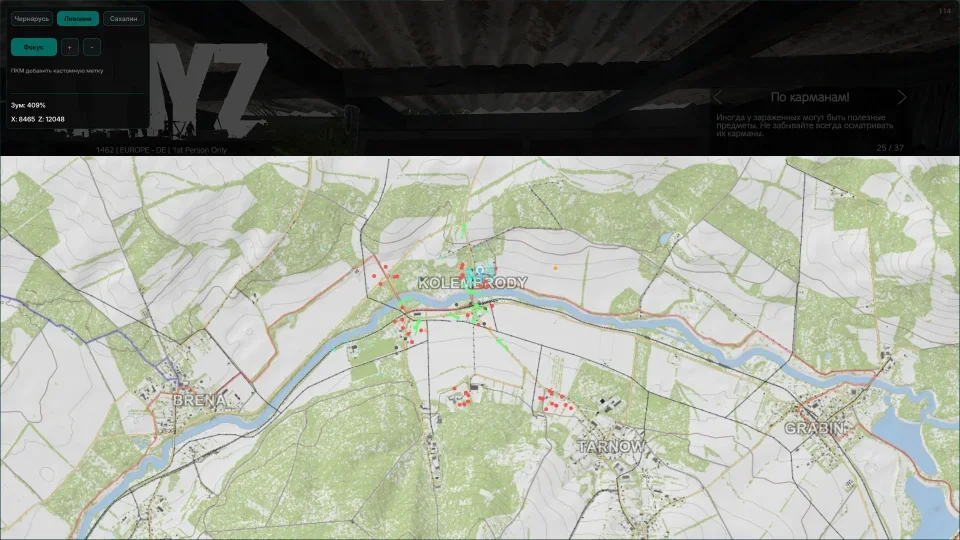
- Enable Map - Enables a world map overlay
- Active map - Chernarus / Livonia / Sakhalin
- Draw Map on Radar - Applies a map texture to the radar
- Bind: Switch map - Open and close the world map
- Local player - Color of self mark on the map
- Show tags: Players, Player Corpses, Zombies, Friends, Animals, Vehicles, Loot
- Distance — Drawing distance of certain markers
- Show Markers on ESP - Displays custom map markers on ESP
- Show Markers on Radar - Displays custom map markers on the radar
- Draw direction of view - Players' line of sight on the world map
- Double RMB on the map - Create a marker
- Double RMB on a marker - Remove marker
- Open menu - Open and close the cheat menu
- Combat Mode - Toggle Combat Mode
- Map
- Switch map - Open and close the world map
- Lists
- Add Friend - Add/remove a friend for the selected player or target in FOV
- Aim
- Silent aim at players - Hold to aim at players
- Silent aim on zombies - Hold to aim on zombies
- Exploits
- Teleport loot - Hold to teleport loot or corpse
- FreeCam
- Switching FreeCam - Enable/disable debug camera
- FreeCam forward - Move the camera forward
- FreeCam backwards - Move the camera backwards
- FreeCam left - Move camera left
- FreeCam right - Camera movement to the right
- FreeCam up - Camera movement up
- FreeCam down - Camera movement down
- FreeCam acceleration - Hold to speed up the camera
Системные Требования
Игровой клиент:

Launcher
Поддерживаемые процессоры:

Intel I AMD
OC:

Windows 10 I 11 (1909 - 25H2)
Spoofer:

Built-in
Античит:

BattlEye
Игровой режим:

Windowed

 Мы
используем куки
Мы
используем куки
Отзывов пока нет.