


Чит Rob Run [Fecurity]
Fecurity — современный программный комплекс для игры Rob Run, созданный для игроков, которые стремятся получить преимущество над соперниками и открыть новые возможности игрового процесса. Софт сочетает в себе функциональность, удобство использования и востребованные игровые инструменты.
Функции Софта
- Aim Assist
- Enabled - master switch for aim assistance.
- Vectored Aim - turns the camera toward the selected target.
- Silent Aim - changes the shot direction while keeping the camera direction unchanged.
- Movement prediction - leads moving targets using their measured velocity and the age of their displayed position.
- Spread prediction - compensates for predicted weapon spread when using Vectored Aim.
- No Spread (Silent Aim) - compensates for predicted single-ray spread, including steady movement on the ground; transitional states may be skipped.
- At Shoot - also activates aiming while the fire button is held.
- Visible Only - selects aim points with a clear line of sight.
- Enemy Only - excludes teammates, including party and clan members.
- Vertical Aim Speed - separate vertical aiming speed for Vectored Aim.
- Horizontal Aim Speed - separate horizontal aiming speed for Vectored Aim.
- FOV - limits the target search angle relative to the current view direction.
- Draw FOV - displays the aiming field-of-view circle.
- Target Switch Delay - delay before switching from the current valid target to another.
- Nearest Coefficient - adjusts how body-part priorities affect aim-point selection.
- Maximum Distance - limits aiming distance, also respecting the current weapon's range.
- Ignore Knocked - excludes knocked-down players.
- Include NPCs - allows aiming at NPCs.
- Aim Keys - two configurable hold keys for activation.
- Toggle Key - a separate key for toggling Aim Assist on and off.
- Hitbox Priority Key - gives greater weight to the selected hitbox priorities while held.
- Hitbox Priorities - separate priorities for the head, neck, torso, both arms and both legs; unwanted areas can be excluded.
- Hand Aim Point - adjusts aim points on the final arm bones to improve hit registration.
- Visuals
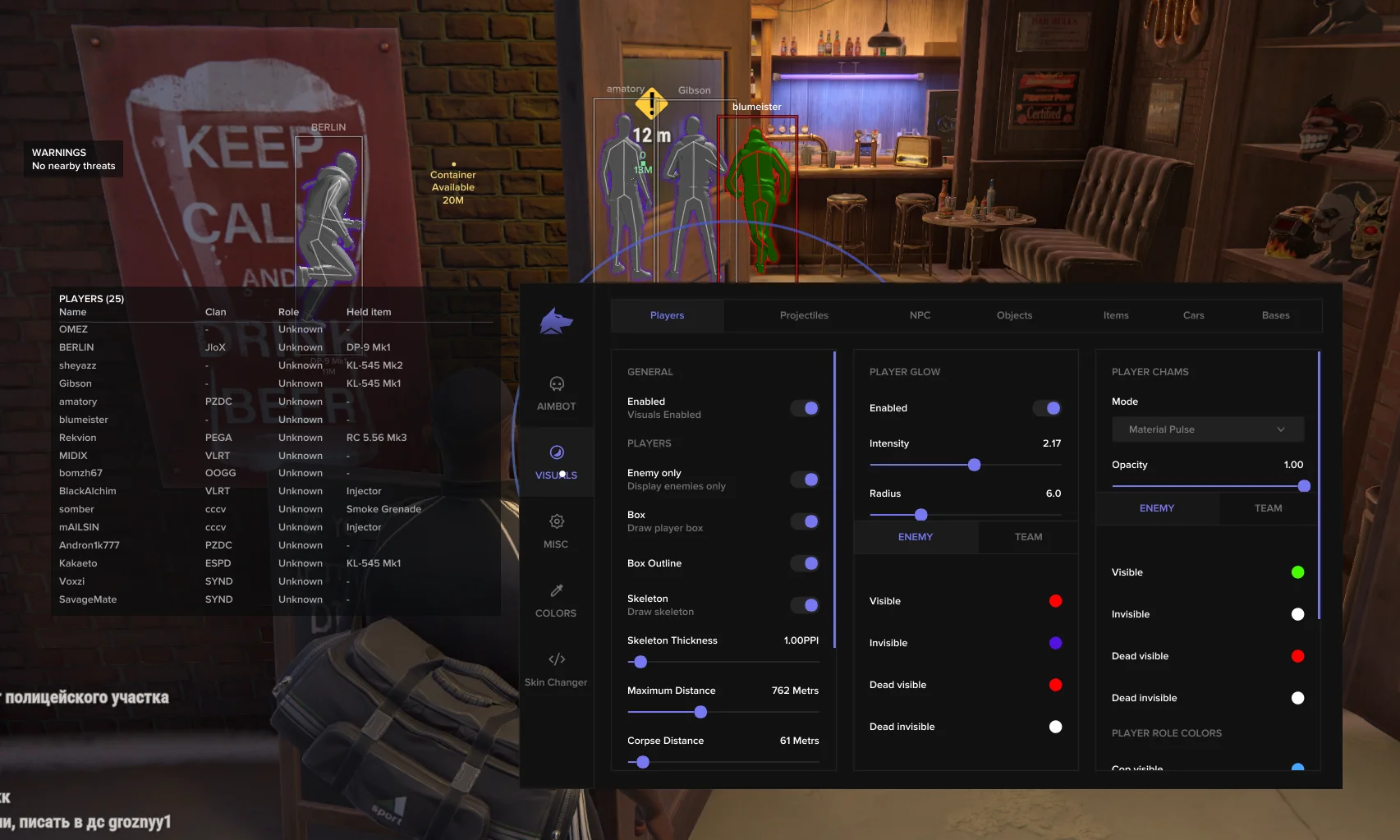
- [Players ESP]
- Visuals Enabled - master switch for visual features.
- Enemy Only - displays enemies only; party and clan members are treated as teammates.
- Box - a 2D box around the player.
- Box Outline - an additional outline around the box.
- Skeleton - displays the player's skeleton.
- Skeleton Thickness - adjusts skeleton line thickness.
- Maximum Distance - limits player display distance.
- Maximum Corpse Distance - a separate maximum display distance for dead players.
- Corpses ESP - displays dead players when model data is available.
- Nickname - displays the player's nickname.
- Distance - displays the distance to the player.
- Held Item - displays the name of the weapon or other item in the player's hands.
- Aiming at You - a blinking tag above a player who is aiming at you.
- Reloading Tag - a blinking reload tag beside the held-item name.
- Role Visibility Colors - separate visible and hidden colors for cops, robbers and civilians.
- Enemy / Team ESP Colors - separate box, skeleton and label colors for enemies and teammates, including visibility and death states.
- [Players Glow]
- Glow - an outline glow around the player model.
- Glow Intensity - adjusts glow intensity.
- Glow Radius - adjusts glow width.
- ENEMY / TEAM - separate enemy and teammate color tabs.
- Glow State Colors - separate Visible, Invisible, Dead Visible and Dead Invisible colors for each team category.
- [Players Chams]
- Chams Mode - choose Disabled, Flat, Material, Flat Pulse or Material Pulse.
- Flat Chams - a flat color fill on the model.
- Material Chams - a shaded fill that gives the model's surface depth.
- Flat Pulse - a flat fill with pulsing model edges.
- Material Pulse - a shaded material with pulsing model edges.
- Chams Opacity - adjusts fill opacity.
- ENEMY / TEAM - separate enemy and teammate color tabs.
- Chams State Colors - separate Visible, Invisible, Dead Visible and Dead Invisible colors for each team category.
- Combined Glow / Chams - allows Glow and Chams to be used together.
- [Projectiles ESP]
- Projectile ESP - displays grenades in a dedicated Visuals subtab.
- Show Name - displays grenade names.
- Grenade Trajectory - displays the path a grenade has already traveled.
- Throw Preview - displays the game's active throw-preview trajectory, including its collision result.
- Bullet Tracers - short-lived, fading lines for your own and other players' shots.
- Grenades Maximum Distance - a separate maximum display distance for grenades.
- Tracers Maximum Distance - a separate maximum display distance for bullet tracers.
- [NPC ESP]
- NPC ESP - displays in-game NPCs.
- Show Name - displays the NPC's name or type.
- Show Distance - displays the distance to the NPC.
- Guards - displays guards with a separate distance limit.
- Traders - displays traders with a separate distance limit.
- Bots / Police - displays bots and police with a separate distance limit.
- Show State - displays available NPC states: idle, suspicious, alerted, preparing a call, calling, hands raised or dead.
- Cops Call Timer - displays the time remaining while a guard is calling the police.
- Show Dead - displays dead NPCs.
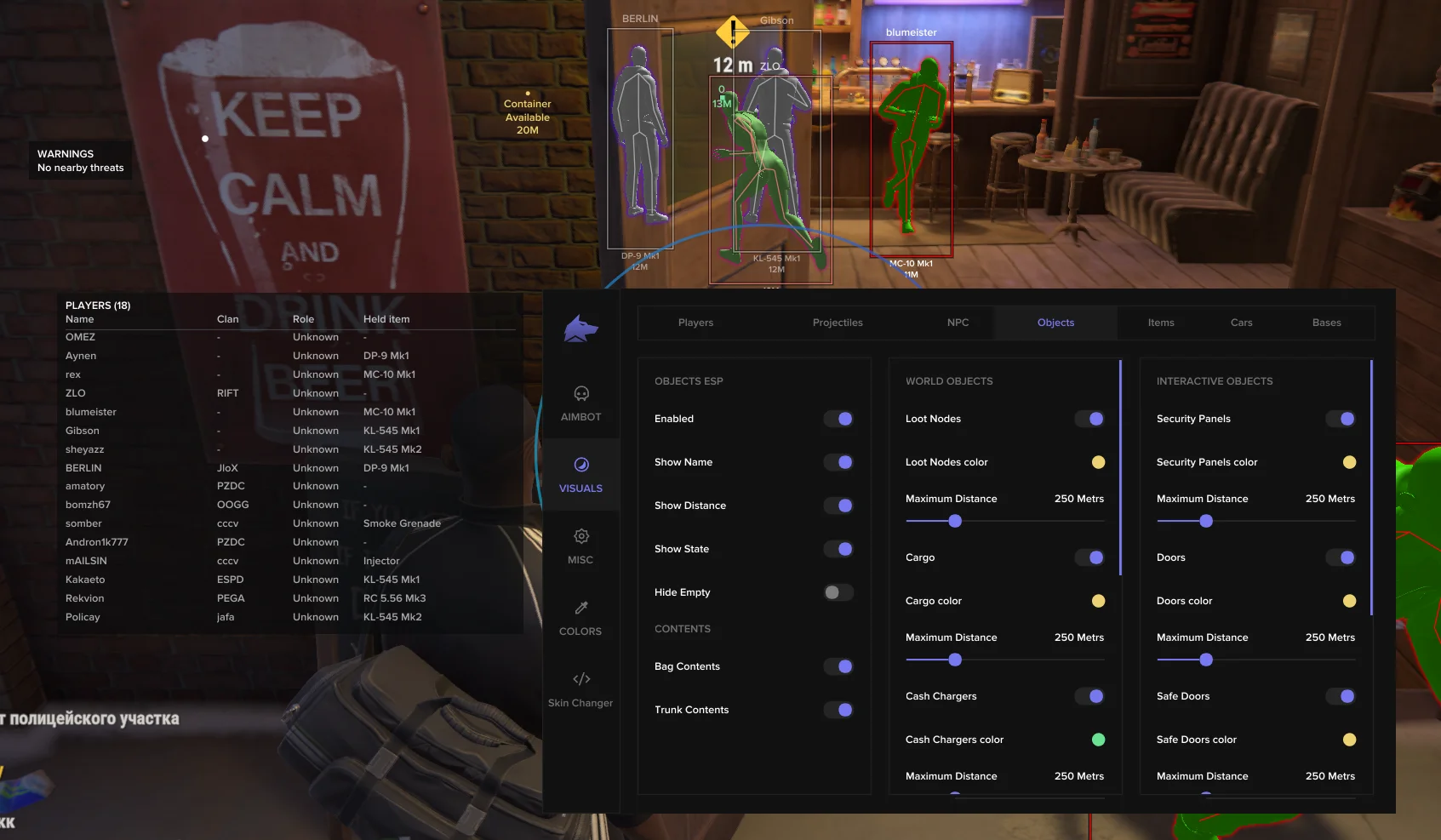
- [Objects ESP]
- Objects ESP - displays world objects.
- Show Name - displays object labels.
- Show Distance - displays the distance to objects.
- Show State - displays available information about contents, charging, availability and object state.
- Hide Empty - hides objects confirmed to be empty.
- Bag Contents - displays bag contents with item quantities.
- Trunk Contents - displays vehicle trunk contents with item quantities.
- Loot Nodes - displays loot nodes.
- Cargo - displays cargo.
- Cash Chargers - displays cash chargers and their state.
- Cash Nodes - displays cash nodes and their available amounts when data is available.
- Player Bags - displays player bags, including the owner's name when available.
- Vehicle Trunks - displays vehicle trunks.
- Security Panels - displays security panels, their hacking state and the associated alarm state.
- Doors - displays doors and their state.
- Safe Doors - displays safe doors, their lock state and transitional states.
- Containers - displays containers and whether they are empty.
- Hide Spots - displays hiding spots and whether they are free or occupied.
- Object Colors - an individual color for each object category.
- Object Maximum Distances - a separate maximum display distance for each object category.
- [Items ESP]
- Items ESP - displays loot items.
- Show Name - displays item names.
- Show Distance - displays the distance to items.
- Item Count - displays item quantities as xN.
- Hide Empty - hides emptied or looted loot objects.
- Show Unrated - separately displays items with no identified rarity.
- Loot Display: By Category - filters loot by item type.
- Weapons - weapons.
- Ammo - ammunition.
- Equipment - equipment.
- Medicine - medical items.
- Grenades - grenades.
- Valuables - valuables.
- Keys / Tools - keys and tools.
- Cash - cash.
- Other - other items.
- Category Maximum Distances - a separate distance limit for each item type.
- Loot Display: By Rarity - filters loot by rarity.
- Common / Uncommon / Rare / Epic / Legendary / Exotic - individual visibility switches for each rarity.
- Rarity Colors - an individual color for each rarity.
- Rarity Maximum Distances - a separate distance limit for each rarity.
- Unrated Maximum Distance - a separate display distance for items with no identified rarity.
- [Cars ESP]
- Cars ESP - displays cars.
- Show Name - displays the car's in-game localized name when available.
- Show Distance - displays the distance to the car.
- Maximum Distance - maximum display distance for car ESP.
- Box Mode - choose None, 2D or 3D.
- 2D Box - a screen-space box around the car's bounds.
- 3D Box - a 3D wireframe box based on the car's dimensions and orientation.
- Owner Filters - separate visibility switches for cars owned by cops, robbers or civilians, and for unowned cars.
- Shared Vehicle Filters - the selected owner filters also apply to Radar and Game Map.
- [Bases ESP]
- Bases ESP - displays available settlement bases without a separate distance limit.
- Owner - displays the base owner's name.
- Clan - displays the clan tag and name.
- Buildings - displays the main building, fence and outbuildings.
- Building Names - localized building labels when a translation is available.
- Base State - displays whether the base is locked, under construction or being moved.
- Distance - displays the distance to the base.
- Bases List - a separate panel listing bases, owners, distances and raid states.
- Transparency - adjusts the transparency of base information.
- Raid State - displays buildings under raid and the raid lock timer.
- Defense Blocks / Modules - displays defense blocks, installed modules and defense points.
- Open Doors - displays the number of open doors among the building's known doors.
- VIP - displays VIP status and remaining time.
- Workbenches - displays equipment for money laundering, cargo opening and exchange, production, cargo charging and crypto farming.
- Facility State - displays whether equipment is working or idle, along with timers, cargo quantities and readiness.
- Money Laundering Info - displays dirty and clean cash amounts, activity and cable status.
- Storages / Containers - displays how full the base's storages and containers are.
- Building Loot - displays cargo left in buildings.
- Facility Contents - displays available item and cargo lists inside equipment.
- Base Door Warning - warns about unclosed doors at your own base, with distance and a direction indicator; works independently of the main HUD switch.
- Base Colors - separate colors for your own base, clan bases and other bases.
- Misc
- [General / Weapon]
- Invisible Opacity - adjusts the opacity of hidden ESP objects.
- No-Recoil - disables weapon recoil.
- Auto Pistol - fires semi-automatic pistols automatically while the fire button is held.
- [Triggerbot]
- Triggerbot - fires automatically when the crosshair is on a valid target.
- Activation Key - a configurable activation key.
- Activation Mode - hold, toggle or always active.
- Settings Mode - use global settings or separate weapon profiles.
- Weapon Profiles - Global, Pistol, Automatic and Other profiles.
- Override Global - overrides global settings for the selected weapon group.
- Hitboxes - selects the head, torso and legs.
- Reaction Delay - reaction delay before firing.
- Click Hold - how long the fire button is held down.
- Click Interval - the interval between button presses.
- Hitbox Scale - adjusts the size of the area checked for triggering.
- Maximum Distance - limits the distance to the target.
- Target Roles - separate switches for cops, robbers and civilians.
- Enemy Only - excludes teammates, including party and clan members; available in each profile.
- Visible Only - triggers only on visible targets.
- Ignore Dead - ignores dead players.
- Ignore Knocked - ignores knocked-down players.
- Ignore in Vehicle - ignores players in vehicles.
- [Radar / Game Map]
- Radar - a separate on-screen radar.
- Rotate with Camera - rotates the radar with the camera.
- Radar Names / Distance - displays names and distances on the radar.
- Radar Range - radar detection range.
- Radar Size / Position - radar size and screen position.
- Radar Opacity - radar opacity.
- Game Map - adds markers to the game's own maps.
- Minimap - displays markers on the minimap.
- Big Map - displays markers on the big map, following its zoom and panning.
- Map Names / Distance - displays names and distances on the game map.
- Map Opacity - opacity of game-map markers.
- Marker Size - adjusts marker size.
- Look Direction - displays look direction.
- Marker Outline - outlines markers.
- Edge Markers - displays target indicators at the map's edge.
- Marker Categories - players, NPCs, bases, cars and surveillance cameras.
- Player Role Filters - cops, robbers and civilians.
- Show Broken Cameras - displays broken surveillance cameras.
- Show Dead - displays dead characters on the map and radar.
- Show Teammates - displays teammates, including party and clan members.
- Category Maximum Distances - separate distance limits for players, NPCs, bases, cars and cameras.
- Role Colors - separate colors for cops, robbers and civilians.
- Object Marker Colors - separate colors for NPCs, cars, cameras, bases and unknown targets.
- Teammate Color - a separate color for teammates.
- Aiming at You Color - highlights players who are aiming at you.
- Vehicle Owner Filters - car-owner filters from Cars ESP also apply to the map and radar.
- [HUD / Warnings]
- HUD - a movable information panel.
- Police Approaching - warns about approaching police, showing their count, distance and direction.
- Police Maximum Distance - limits the range of police warnings.
- Aiming at You - warns about a player who is aiming at you, showing their name, distance and direction.
- Pop-up Notifications - pop-up alerts for approaching police and players aiming at you.
- Base Doors - a separate warning for unclosed house doors, fence gates and garage gates at your own base.
- Base Door Direction - displays direction, distance and the number of known open doors; works even when HUD is disabled.
- HUD Offsets - horizontal and vertical widget offsets.
- HUD Scale - adjusts widget scale.
- HUD Background - adjusts background opacity.
- Widget Dragging - drag the HUD and base warning with the mouse while the menu is open.
- [Player List]
- Player List - a movable table of players on the server.
- Distant Players - unloaded players remain listed with their available names and IDs.
- Column Selection - choose name, clan, role, distance, held item, state and ID columns.
- Sorting - sorts by distance, name or role.
- Maximum Rows - sets the maximum number of rows.
- Role Colors - colors rows by player role.
- Threat Highlight - highlights players aiming at you in red.
- Scale / Background - table scale and background opacity.
- Dragging - drag the table with the mouse while the menu is open.
- [Battle Mode]
- Battle Mode - quickly switches to a reduced display for combat.
- Activation Key - a configurable activation key.
- Activation Mode - toggle or hold.
- Auto Enable - activates automatically when someone aims at you or police approach.
- Auto Disable After - deactivates after a set time once the threat is gone.
- Skeleton Only - displays players as skeletons only in Battle Mode.
- Visible Only - displays only visible players in Battle Mode.
- Limit Distance - a separate player distance limit for Battle Mode.
- Hide Knocked - hides knocked-down players.
- Hide Team - hides teammates, including party and clan members.
- Hide Game Map - hides the map and radar during combat.
- Hide HUD - hides the HUD during combat.
- Hide Player List - hides the player list during combat.
- Hide Glow - disables Glow during combat.
- Hide Aim FOV - hides the FOV circle during combat.
- [Free Camera]
- Free Camera Enabled - allows Free Camera to be used.
- Toggle Key - independently activates and deactivates the camera; defaults to F7 and does not change the Enabled checkbox.
- Mouse Look - controls the view with the mouse.
- WASD Movement - moves the camera with the standard movement keys.
- Vertical Movement - moves up with Space and down with Ctrl.
- Speed Boost - speeds up the camera while Shift is held.
- Movement Speed - adjusts base movement speed.
- Mouse Sensitivity - adjusts look sensitivity.
- Boost Multiplier - adjusts the speed-boost multiplier.
- Player Input Block - blocks normal character controls while Free Camera is active.
- Camera Restore - restores normal camera and character controls when Free Camera is deactivated.
- [Overlay / Interface]
- Screen Protection - hides the overlay from supported screen-capture methods.
- V-Sync - vertical synchronization for the overlay.
- FPS No Limit - removes the overlay frame-rate limit.
- Frame Limit - sets the overlay FPS limit.
- Distance Unit - selects the units used to display distances.
- Menu Key - a configurable key for opening the menu.
- Interface Scale - adjusts interface scale.
- Interface Colors - adjusts colors for menu borders, text, descriptions, backgrounds and control states.
- Color Templates - preset color swatches for quick selection.
- Skin Changer
- Enabled - master switch for local appearance changes.
- Weapon Skins - applies compatible skins to the weapon in your hands.
- Weapon Skin Selection - selects a skin from the list for the current weapon.
- Clothing Skins - changes the local character's clothing appearance.
- Male Outfit - a separate selection for the male outfit.
- Female Outfit - a separate selection for the female outfit.
- Car Skins - applies compatible materials and appearances to cars.
- Car Appearance Selection - selects compatible appearances for the current car; your own cars are considered when you are on foot.
- Compatibility Filter - lists skins compatible with the selected weapon or car.
- Localized Names - uses in-game names for clothing, skins and cars when localization is available.
- Default - restores the default appearance.
- Independent Categories - weapons, clothing and cars can be enabled separately.
- Client-side Appearance - appearance changes are applied on the client side
Системные Требования
Игровой клиент:

Steam Нужно выключить Secure Boot
Поддерживаемые процессоры:

Intel & AMD
OC:

10-11 (22H2-26H2) Только UEFI
Spoofer:

None
Античит:

EAC
Игровой режим:

Оконный / Полноэкранный в окне

 Мы
используем куки
Отзывов пока нет.