


Чит Squad [Focus]
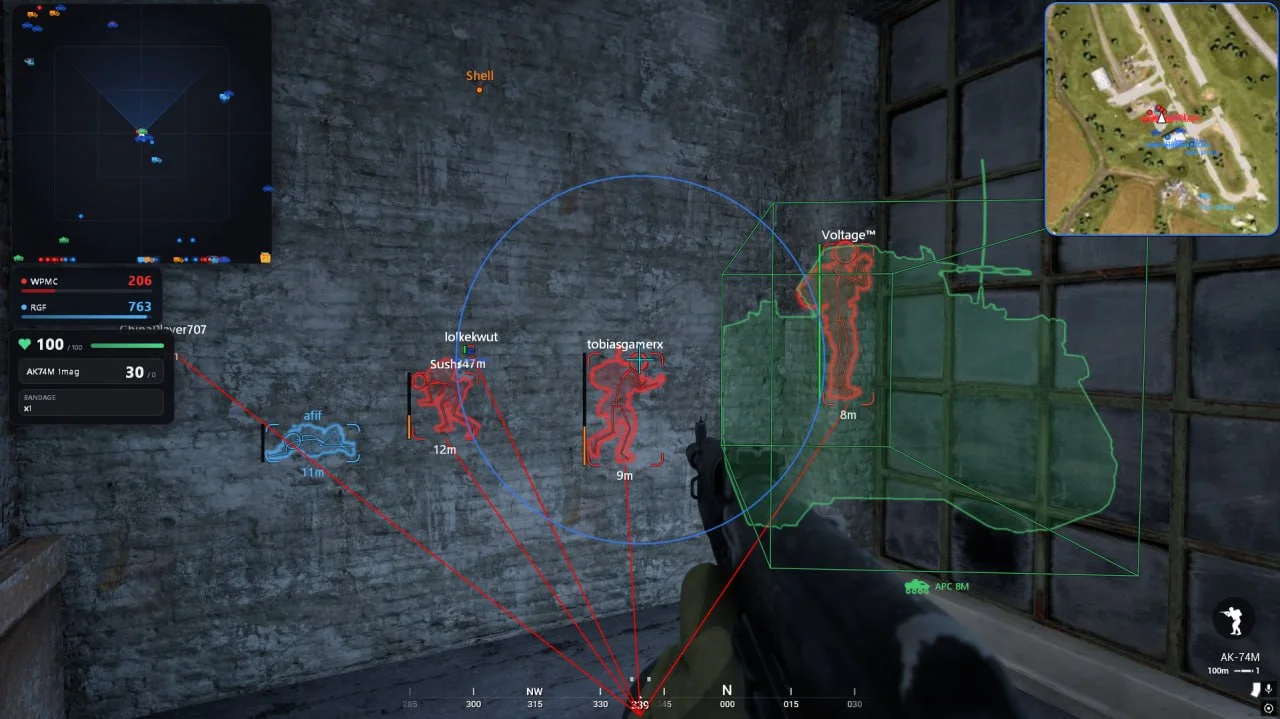
Ищете надежные приватные читы для Squad? На сайте dragon-hack.pro вы можете приобрести приватный софт Focus с широким набором функций для комфортной и продвинутой игры. Focus предлагает Aimbot для улучшения точности наведения, а также ESP для отображения противников, союзников и других игровых объектов.
Функции Софта
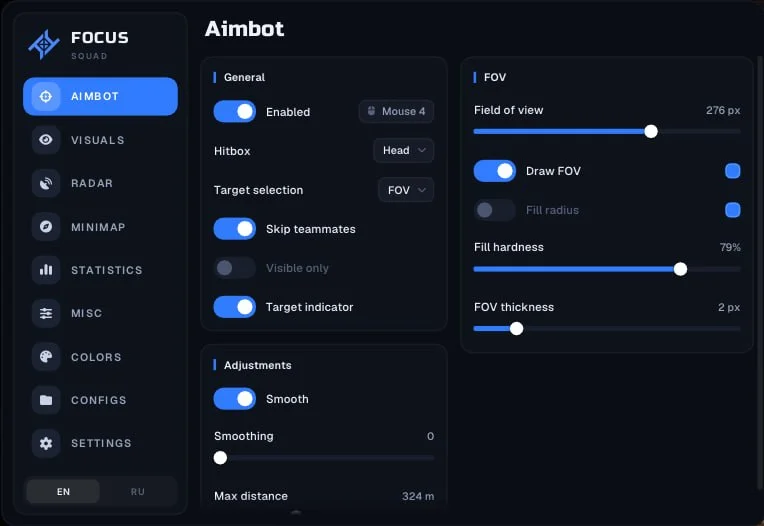
- Aimbot
- Enabled & keybind
- Enable aim assistance and assign a custom activation key.
- Hitbox
- Head, Chest or Closest.
- Target selection
- Select targets by field of view or distance.
- Skip teammates
- Exclude teammates from aim targets.
- Visible only
- Aim only at visible targets.
- Target indicator
- Highlight the current aim target.
- Field of view
- Adjust the aim FOV radius.
- Draw FOV & fill
- Display the FOV circle and its fill.
- Fill hardness
- Adjust the FOV fill hardness.
- FOV thickness
- Adjust the FOV circle outline thickness.
- Smooth & smoothing
- Enable smoothing and adjust aim movement smoothness.
- Max distance
- Set the maximum targeting distance.
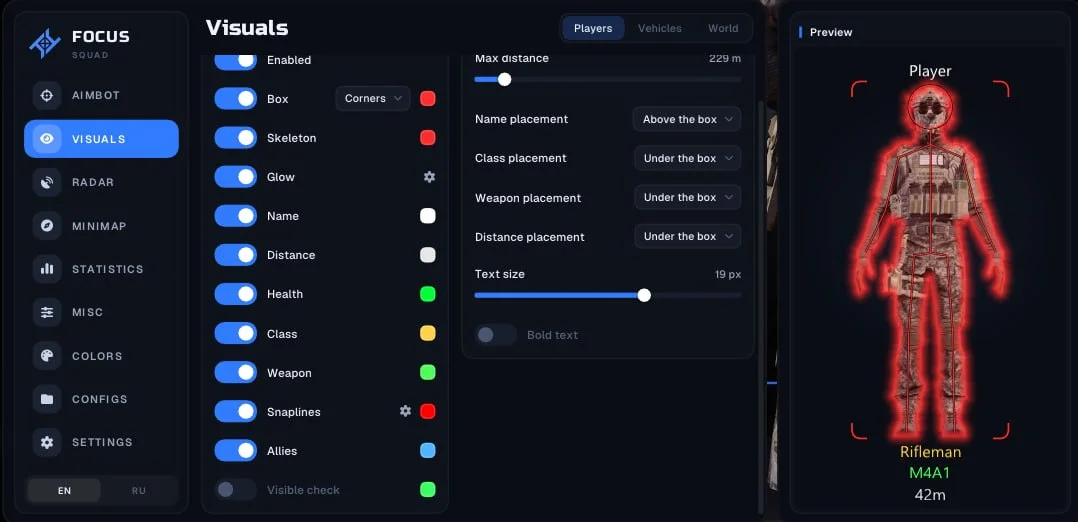
- Visuals · Players
- Box
- Corners, Full or 3D boxes, with adjustable corner rounding.
- Skeleton
- Display player skeletons.
- Glow
- Highlight players and adjust glow thickness.
- Name
- Display player names.
- Distance
- Display the distance to players.
- Health
- Show player health.
- Class
- Display player classes.
- Weapon
- Display the weapon a player is holding.
- Snaplines
- Draw lines to enemies and teammates.
- Allies
- Show or hide allies. Enemies are always shown; there is no separate enemy toggle.
- Visibility check
- Check player visibility and apply the visible-player color.
- Max distance
- Set the maximum player ESP distance.
- Label placement
- Independently position names, classes, weapons and distance labels.
- Distance beside name
- Display the distance next to the player name.
- Text size & bold text
- Adjust label size and enable bold text.
- Preview
- Preview player ESP in a separate panel.
- Visuals · Vehicles
- Enabled
- Enable vehicle ESP.
- Vehicle types
- Motorcycle, Jeep, Jeep Artillery, Truck, APC, Anti-Air Tracked, IFV, Tank, Helicopter and Boat.
- Box
- Corners, Full or 3D boxes, with adjustable corner rounding.
- Glow
- Highlight vehicles and adjust glow thickness.
- Name & distance
- Display vehicle names and distance.
- Show team
- Include friendly vehicles.
- Icons
- Display vehicle icons.
- Icon & text placement
- Adjust icon and text positions, including icons beside text.
- Icon & text size
- Adjust icon size and text size.
- Distance scaling
- Scale vehicle icons and text with distance.
- Max distance
- Set the maximum vehicle ESP distance.
- Per-type settings
- Customize each type independently: box, box style, glow, icon, positions and sizes.
- Sync & reset
- Synchronize per-type settings with the shared settings or reset them to the shared settings.
- Preview
- Preview vehicle ESP in a separate panel.
- Visuals · Deployables
- Enabled
- Enable deployable ESP.
- Deployable types
- Ammo crate, HAB, Repair, Mortar, FOB radio and Helipad.
- Mortar shells
- Display mortar shells in flight.
- Box
- Corners, Full or 3D boxes, with adjustable corner rounding.
- Glow
- Highlight deployables and adjust glow thickness.
- Name & distance
- Display deployable names and distance.
- Friendly & enemy
- Control friendly and enemy deployables separately.
- Icons
- Display deployable icons.
- Icon & text placement
- Adjust icon and text positions, including icons beside text.
- Icon & text size
- Adjust icon size and text size.
- Distance scaling
- Scale deployable icons and text with distance.
- Max distance
- Set the maximum deployable ESP distance.
- Per-type settings
- Customize each type independently: box, box style, glow, icon, positions and sizes.
- Sync & reset
- Synchronize per-type settings with the shared settings or reset them to the shared settings.
- Preview
- Preview deployable ESP in a separate panel.
- Radar
- Enabled & keybind
- Enable the radar and assign a custom key.
- Shape
- Circle or Square.
- Transparency
- Adjust radar transparency.
- Range & size
- Adjust radar range and panel size.
- Markers
- Circles or Icons.
- Marker size
- Adjust radar marker size.
- Drag & wheel zoom
- Drag the radar with the mouse while the menu is open and zoom with the mouse wheel.
- Minimap
- Enabled & keybind
- Enable the minimap and assign a custom key.
- Shape
- Circle or Square.
- Rotate with camera
- Rotate the minimap with the camera direction.
- Map size & zoom
- Adjust the minimap size and zoom level.
- Zoom keys
- Assign separate zoom-in and zoom-out keys.
- Opacity
- Adjust minimap opacity.
- Entities
- Show enemies, allies, vehicles and deployables.
- Type filters
- Select which vehicle and deployable types to display.
- Markers
- Icon or Dot.
- Labels
- Configure labels for enemies, allies, vehicles and deployables, including names, distances and their placement.
- Text size
- Adjust label text size.
- Marker size
- Adjust minimap marker size.
- Player marker
- Show your own position on the minimap.
- Map background, grid & play area
- Display the map background, grid and play area.
- Drag & wheel zoom
- Drag the minimap with the mouse while the menu is open and zoom with the mouse wheel.
- In-game map
- Enabled
- Enable the in-game map overlay.
- Entities
- Show enemies, allies, vehicles and deployables.
- Type filters
- Select which vehicle and deployable types to display.
- Markers
- Icon or Dot.
- Labels
- Configure labels for enemies, allies, vehicles and deployables, including names, distances and their placement.
- Text size
- Adjust label text size.
- Marker size
- Adjust in-game map marker size.
- Hide radar & minimap
- Hide the radar and minimap while the in-game map is open.
- Statistics
- Enabled
- Display the statistics panel.
- Weapons
- Show weapon information.
- Grenades
- Show grenade information.
- Bandages
- Show bandage information.
- Drag panel
- Drag the statistics card with the mouse while the menu is open.
- Misc
- Wheel zoom
- Zoom using the mouse wheel.
- Key zoom & keybind
- Enable key zoom and assign a custom key.
- Max zoom
- Adjust the maximum zoom level.
- Screen crosshair
- Display a custom on-screen crosshair.
- Crosshair style
- Cross, Plus, Dot or T.
- Size, gap & thickness
- Adjust crosshair size, center gap and line thickness.
- Follow the weapon
- Make the crosshair follow the weapon.
- Tickets
- Display team ticket counters.
- Tickets transparency
- Adjust ticket panel transparency.
- Drag tickets
- Drag the ticket panel with the mouse while the menu is open.
- Colors
- Players
- Customize enemy, teammate, skeleton, visible-player, name, distance, class, weapon, snapline and health colors.
- Aimbot & crosshair
- Customize the FOV circle outline, FOV fill and on-screen crosshair colors.
- Vehicles & deployables
- Set an individual color for every vehicle and deployable type.
- Menu accent
- Choose an accent preset or set a custom accent color.
- Configs
- Load last on startup
- Load the last used configuration when the program starts.
- Autosave interval
- Save changes instantly, every 30 seconds or every 5 minutes.
- Create
- Create a configuration profile.
- Save
- Save the current configuration.
- Load
- Load a saved configuration.
- Delete
- Delete a saved configuration.
- Menu
- Menu key
- Assign the key used to open the menu.
- Panic key
- Assign a custom panic key.
- Menu size
- Adjust the menu size.
- Streamproof
- Hide the overlay from supported recording and capture methods.
- Language
- Choose English or Russian.
- Reset menu settings
- Restore the menu settings to their defaults.
Системные Требования
Игровой клиент:

Steam
Поддерживаемые процессоры:

Intel & AMD
OC:

Windows 1022H2 / 1125H2 / Только x64 (64-бит)
Spoofer:

None
Античит:

Easy Anti-Cheat (EAC)
Игровой режим:

All

 Мы
используем куки
Отзывов пока нет.